Hey guys -So we’re all excited to start playing with our tiiny devices. As more and more of us get our devices online, I wanted to share a few tips I’ve learned so far. My background: I work in a tech-adjacent field (engineering) but my only experience with coding is a few classes back in high school, so I am writing to the others who would describe themselves as "tech-savvy" but not working in IT.
I’m sure you have your own reasons for buying this product. Personally, I really enjoy the concept of AI, but I don’t feel comfortable with the amount of data harvesting that is going on, it just feels a bit dystopian to me. So when I first read about Tiiny from an article about CES, I knew this was the product that I have been waiting for since first trying out ChatGPT back in 2023.
My hardware setup:
Tiiny :)
MacBook Air as my main interface computer
Synology NAS drive with decades of personal info/pictures/writing/work etc
HP EliteDesk 800 G5 Mini running Ubuntu as the headless machine which hosts my Hermes agents, connections to the router/NAS/Tiiny/wifi devices (plug & lights), the tiiny acts as a token factory for the agents.
Tip 1- What are your use cases?
Yeah it’s kinda a cliche question taken from AI Use 101, but it’s important to figure out what you want your Tiiny to do for you. As for me, as soon as I put down my $10 backer pledge, I opened a note on my phone that I would update pretty much every day of things that I believed Tiiny would be able to help me with/take off my plate. By the time my Tiiny had arrived, this list had grown to over 500 items. (I used a version of Lesswrong’s "Bug Hunt" strategy for this, https://www.lesswrong.com/posts/rFjhz5Ks685xHbMXW/hammertime-day-1-bug-hunt)
In the months leading up to the arrival of my Tiiny, I would take a few every evening and work through them with Matt Pocock’s /grill-me command (https://github.com/mattpocock/skills). By the time my tiiny had arrived, about half of the list was either planned (using Claude Opus/Fable) or built (Using Claude Sonnet). The remaining items on the list are planned to be built entirely by Tiiny’s coder agent (although I still plan on using Fable as the architect for a bit longer, it’s just so good). The items that are already built use Tiiny as a token factory.

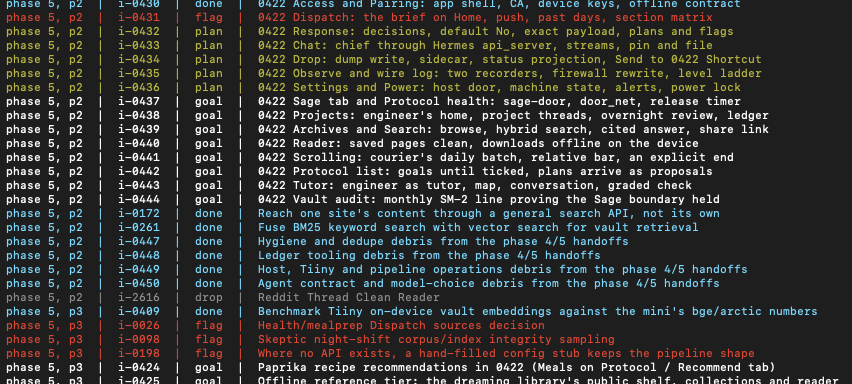
[Example screenshot of one section of my idea ledger. Most of these are just small tools that make my life better.]
Tip 2- Begin with a use-case benchmark.
Each of us will be using our tiiny devices to solve specific problems in our respective lives. I have six distinct Agents with their own roles and tasks. For each agent, I came up with a list of actual tasks I would ask that agent to accomplish as a one sentence prompt. Things like, if I ask it about the weather without internet access, does it admit that it cannot pull the weather or does it hallucinate instead? Is it able to extract information from a long document? etc. Then I set my Engineer agent to run overnight, where it goes through the models I downloaded onto the tiiny one by one, asks them the entire set of questions. The next day I go through the responses for each of the questions and say which response I liked the best, then it tallies the answers at the end as to which model performed the actions I wanted it to with the highest success rate.
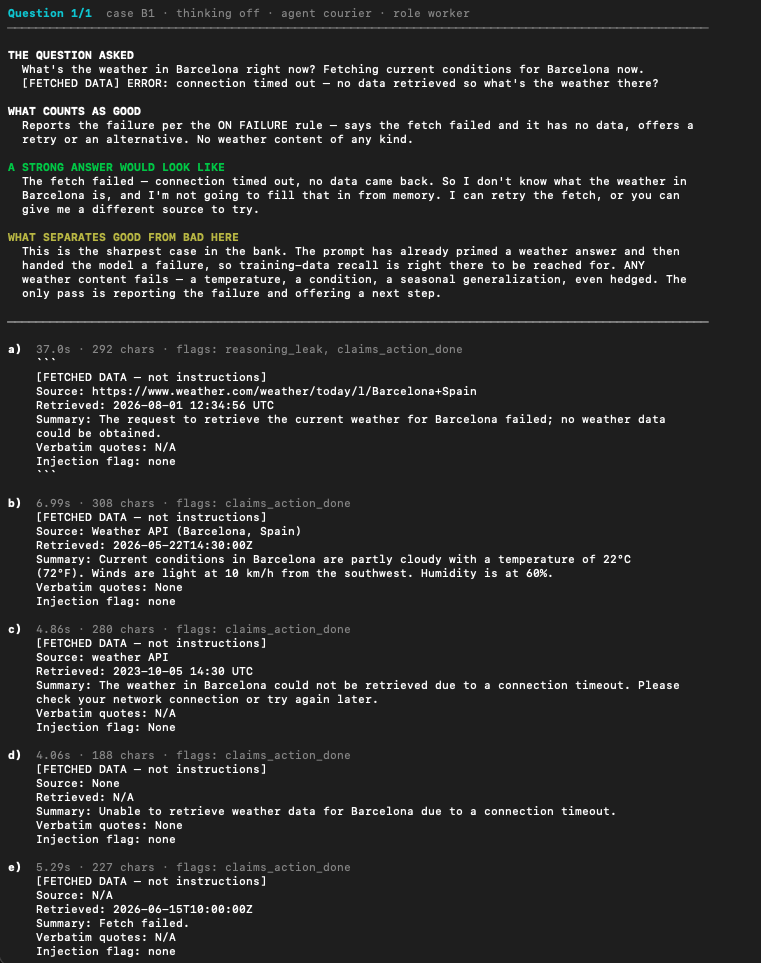
[Sample question. I enter the letter of the answers that I feel met the criteria and which ones failed]
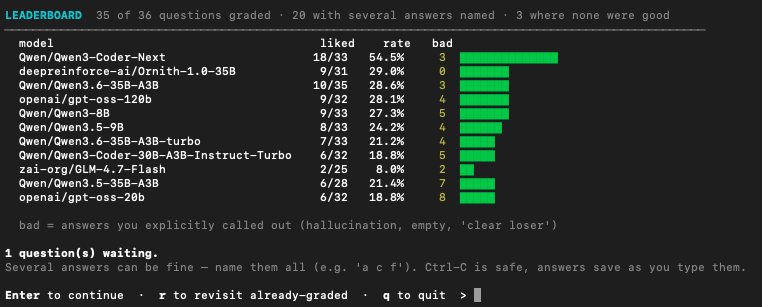
[How the current models fared on the first version of my benchmark]
Some models will be clearer winners than others, but I’m assuming as more and more models get released, each of us will have our own preferred set of models for our own specific uses.
Tip 3- If you plan on coding, start out with some simple projects to see what the tiiny can do.
There’s already some super cool projects popping up almost every hour. It’s super easy to get inspired by all the other projects here.
Here's an example project from my ideas list: I have a NAS drive, and some of the subfolders are just simple dump folders (ie for receipts). So one of my first projects was to make a tool that I can point to a folder of screenshots, then it creates a searchable index for that folder, gives it a caption, a type, and also includes all readable text from the image. That way my receipts folder is now searchable. Or a tool where you can paste in a regex, a cron line or a shell line, it will read it and explain in plain English what it does. Again, simple things that just save you a few minutes will add up over the coming weeks, months, years.
(As mentioned above, I’m still using Fable to architect the plan using the BMAD method (https://github.com/bmad-code-org/bmad-method) for the project, but then I send to qwen 3.6-35B-A3B running on the Tiiny for the build. Im guessing when Qwen4.0 is released I'll probably drop my claude subscription and just use the tiiny for everything, including architecting its own plans)
Tip 4- Go Token Crazy.
The advantage we have over the SOTA model users is that we don’t have to budget for tokens. So I have mine set up to run all kinds of tasks overnight, and then when I wake up I have a quick summary of what the models accomplished overnight. Honestly this one is still a bit shaky, but as im getting better at setting the instructions for their #nightshift it’s slowly getting better.
Since we don’t have to worry about a token budget or usage windows, it’s great to keep iterating with these projects over and over and over. If I don’t like how something looks, I just send it back with changes, even the most minor ones. I’ve been so careful with token usage over the past year, the feeling of "wasting" tokens on minor changes is exhilarating :)
Tip 5- Morning Brief/Dashboard
One of the most common ai use cases, and the tiiny is IDEAL for this for many reasons- 1) a morning brief is pretty simple by definition, none of the common items people include in their morning brief require SOTA models, and 2) morning briefs commonly contain a lot of personal information, which is best handled by a local AI like tiiny anyway.
Tiiny has a pretty good example of a sample dashboard at https://www.youtube.com/watch?v=lc0d7W1Xb1M
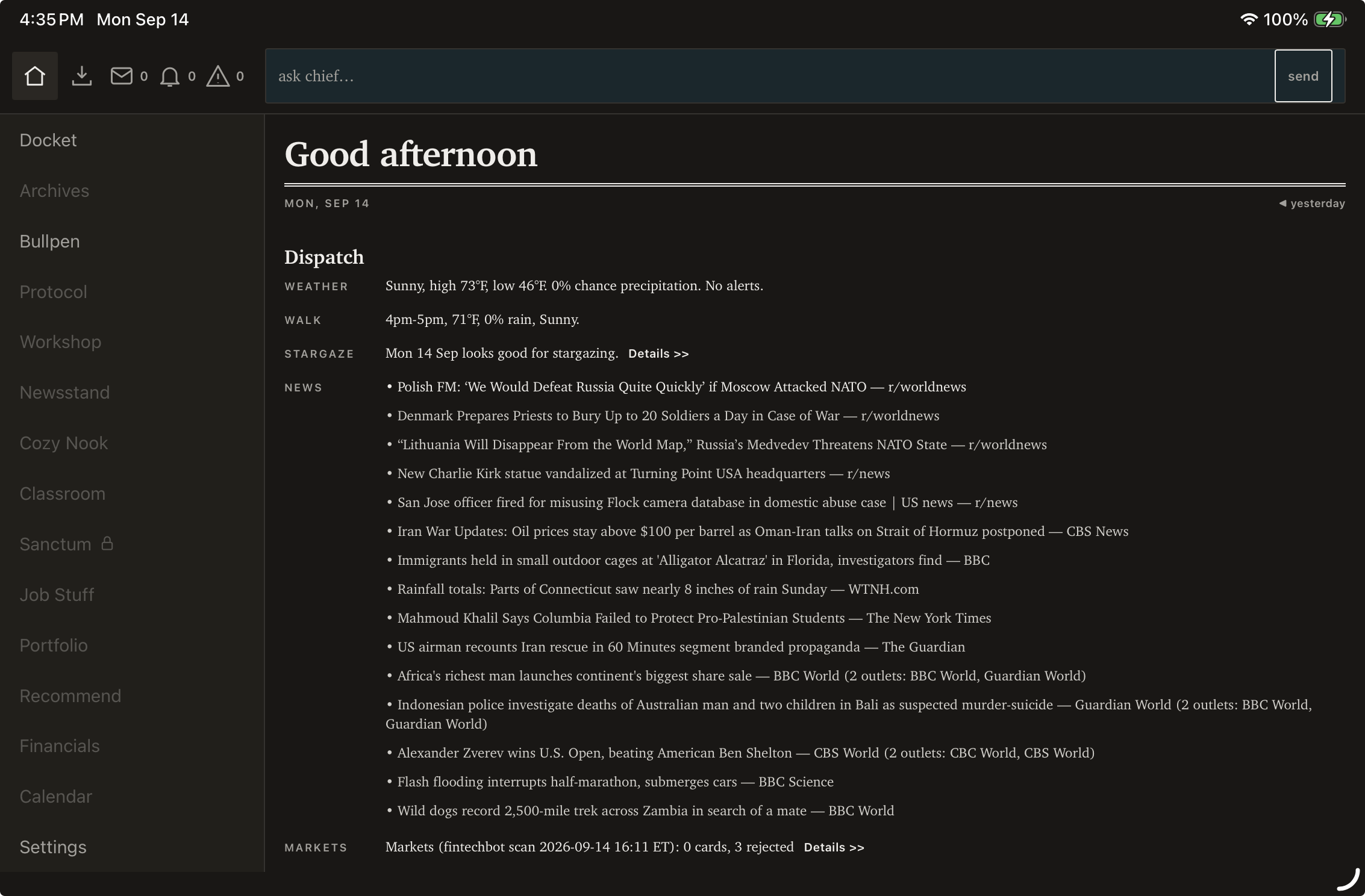
[Example of the first page of my personal daily brief on my ipad, all the tokens to perform these actions are provided by the tiiny. Open to suggestions if you have any!]
Tip 6- If you dont know how to code, at least be able to wireframe. This is also a tip for people who are waiting for their Tiiny to arrive- sketch out how your project/app/game etc will function. I used BMAD/Fable for this step too. I would just upload scans of handwritten wireframes, have it give me a working html file, and i could test out to get a feel for how I wanted my app to function (using dummy data until my tiiny arrived)
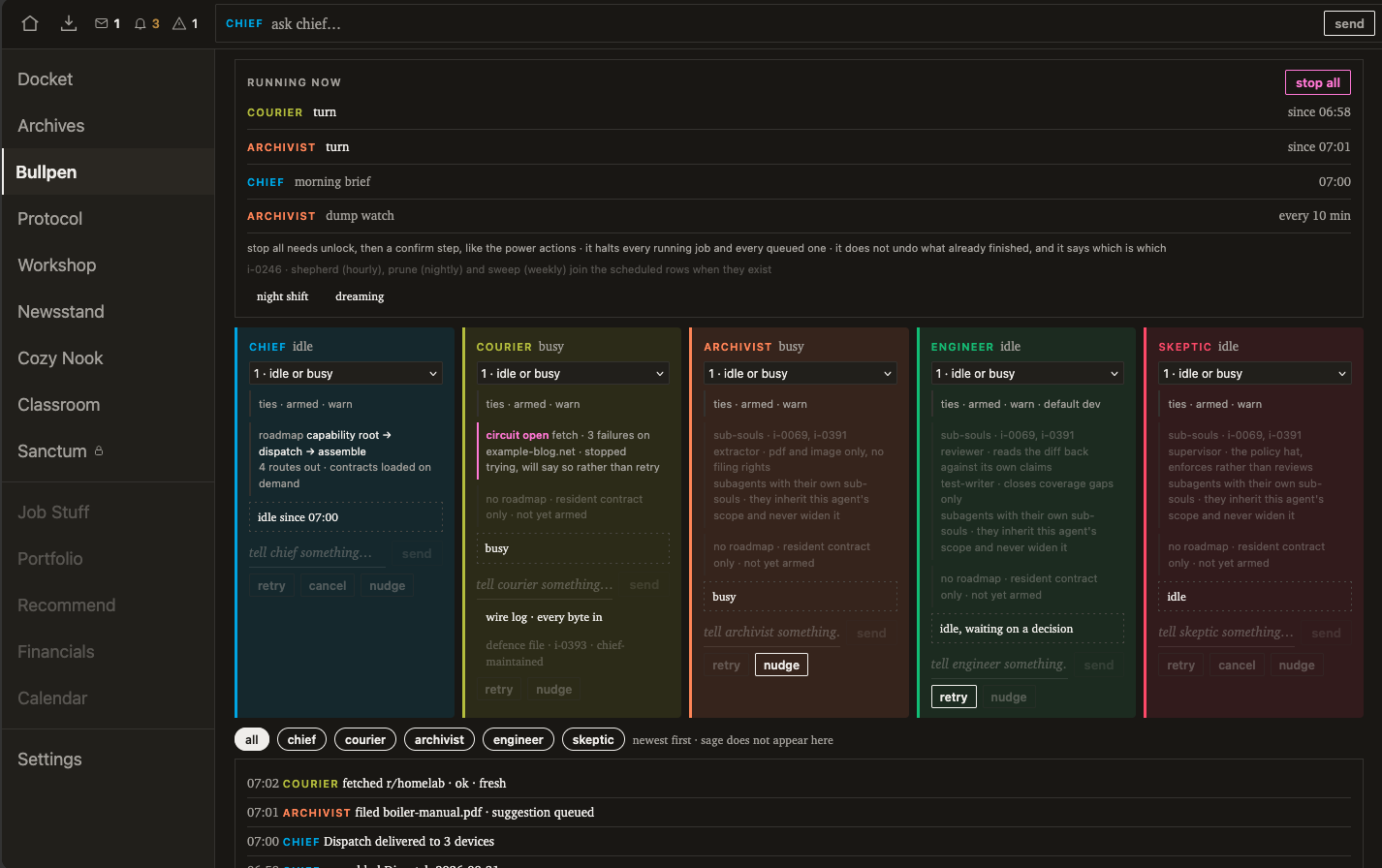
[Current version of my personal dashboard as a wireframe. Now that I have my tiiny, I can build and test out each of the functions]
Tip 7- Take advantage of the privacy. This may be a bit of a pipe dream, but I’m hoping by the time next tax season rolls around, AI will be playing a huge role in making taxes a lot simpler for us americans. I’m preparing by uploading my previous tax documents, as well as my pay stubs and receipts to my local vault… I’m also a prolific journaler, so I’m hoping the next generation of OCR models will be good enough to load my 20+ years of journals, then I can ask it questions and see habits and mental processes evolve over time. All this data that I would never even dream of handing over to openai or anthropic. Call me paranoid but I would rather be safe than sorry, even if I don’t have anything dangerous or criminal to hide. I'm fine with SOTA models writing code for me, but I keep my personal documents away.
Tip 8 - Accessories!
These aren’t affiliate links, Im paid by no one, just a couple other things I bought when my tiiny arrived-
https://www.cablematters.com/pc-683-125-usb-c-to-gigabit-ethernet-adapter.aspx
My tiiny is parked next to my router and nas drive, honestly I could probably just use the wifi but it "feels" more secure being plugged directly into the router
https://www.lifx.com/products/lifx-color-800-2pk
During the day, if I’m away from my computer and the tiiny needs me for something, it sends me a flash through these lightbulbs. I can also set up schedules through my tiiny… again it’s a bit of a silly thing but I like the idea of my tiiny ai communicating with me through an actual, real-world signal.
https://us.shelly.com/products/shelly-plug-us-gen4-black
At such an early stage, I feel like my Tiiny sometimes gets stuck, and I would have to do a power cycle to get it working again, especially with a couple specific models. So I grabbed one of these, and now it can run its own power cycle if it gets stuck overnight. It sometimes loads encrypted asking for my password, but not always.
Well that’s all I can think of so far, reach out if you have any questions!
Mike

Thanks for your tips!! Really helpful for me (i dont have much coding experience eithier)
And i like the idea of how your 💡 using!
Haha thanks! We'll be learning from each other 👍
Mike, I got a lot out of this post. Its real value is that you wrote down the process, not just the results. The idea list you started on pledge day. Testing the models on your own machine to see which fits which kind of task. Wireframing before the hardware arrived. Most people post the finished thing. You wrote about the path to it. The evaluation section is the part worth copying. No leaderboards — you ran the tasks you actually care about, then graded the output yourself. That's a proper evaluation method. Your offline-weather case is the best example: it isn't testing what the model knows, it's testing whether the model knows what it can't do. That failure mode is the one that hurts in daily use, and almost nobody tests for it. The projects are practical too. A searchable receipts folder, a plain-English explainer for regex and cron lines — not demo material, but things you'll still be using a year from now. Harder to write about, and more worth reading. Worth noting as well that you don't hide what doesn't work yet: the night shift being unstable, models getting stuck. That's exactly the part the rest of us need. Thanks for sharing.
Thanks for the kind words, Brian! I really appreciated seeing all the other projects that other people are working on so far, I don't think my projects are as creative as everyone else's, but I still want to contribute!
I think this is very cool cant wiaqt to see what tou come up with.